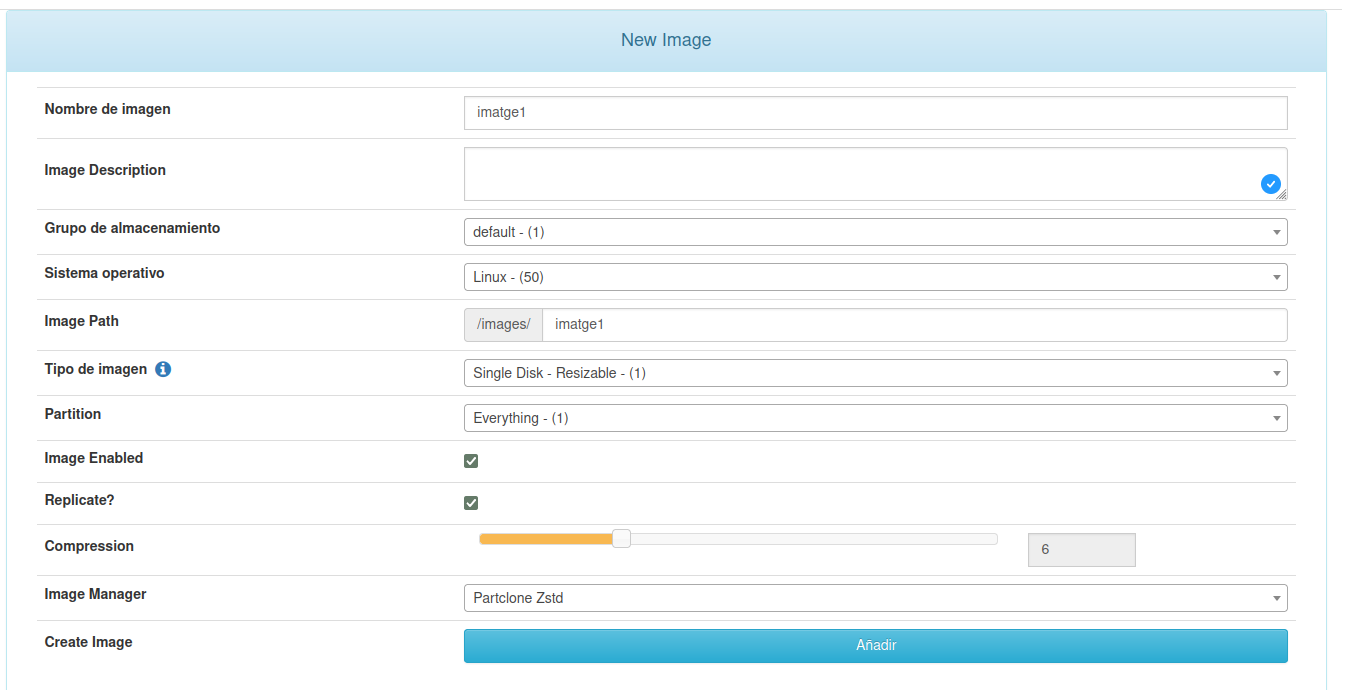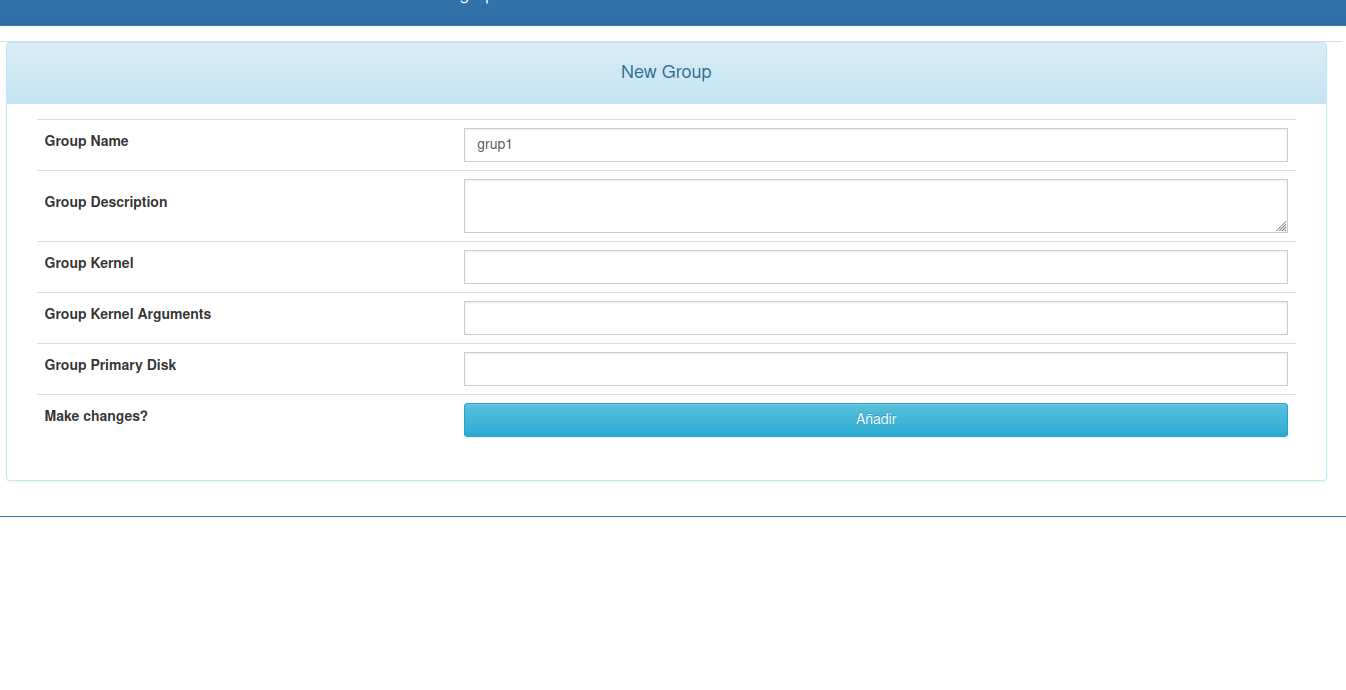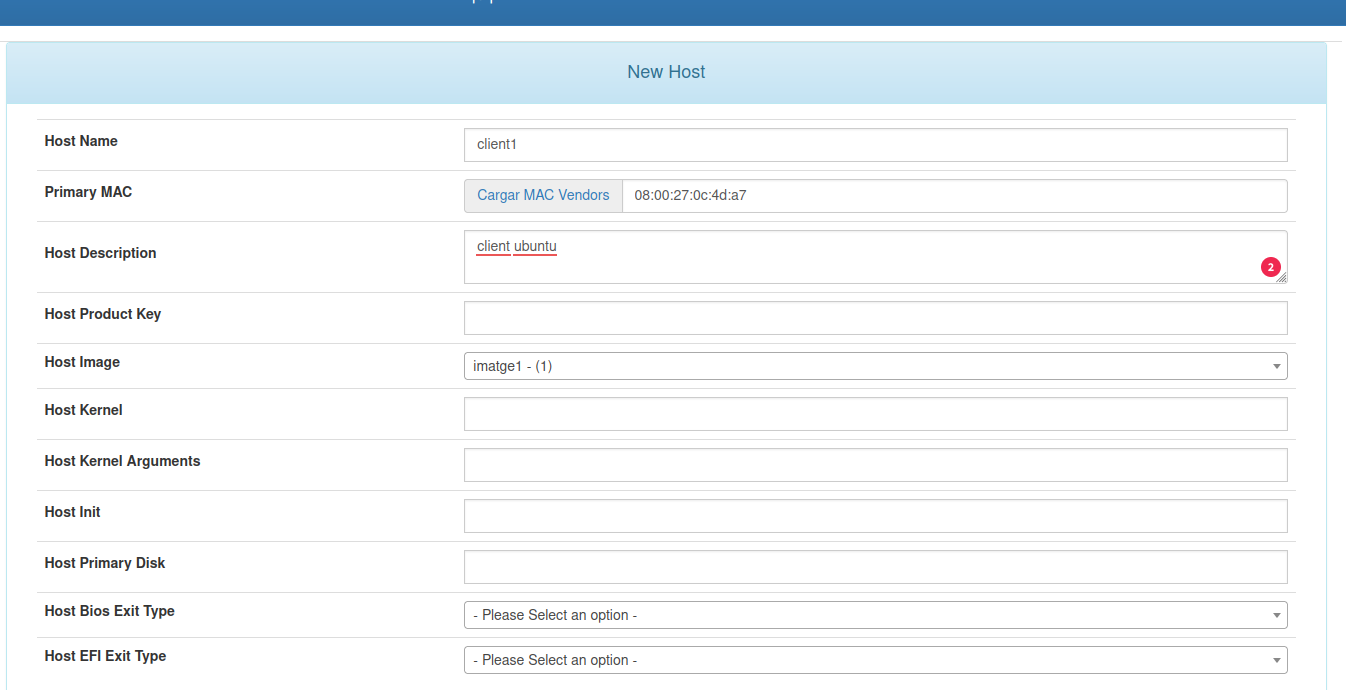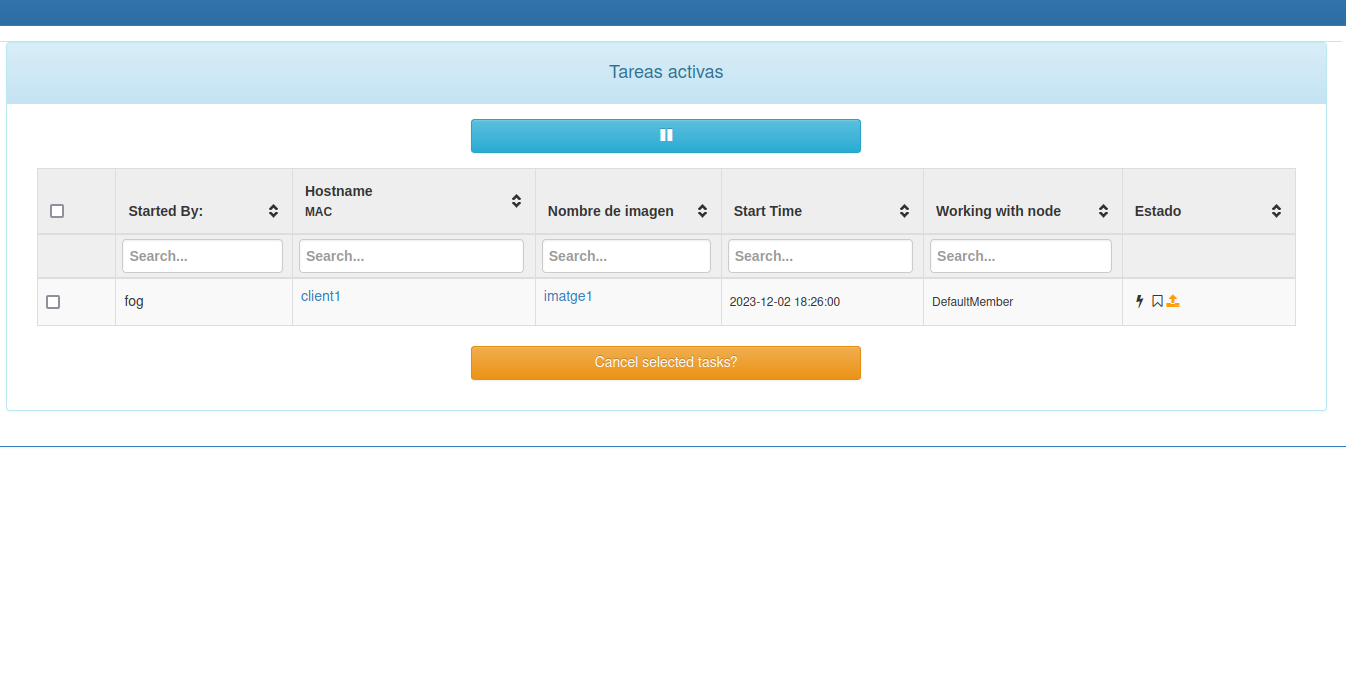
FOG Project és una solució de clonació i desplegament d’imatges de disc basada en xarxa, de codi obert i gratuïta. Permet capturar i restaurar imatges de sistemes operatius Windows i Linux a través de PXE (arrencada per xarxa), sense necessitat de suports físics.
FOG s’instal·la sobre Linux. Les distribucions compatibles inclouen:
- Ubuntu 16 o superior
- Debian 8 o superior
- CentOS 7 o superior
- Red Hat 6 o superior (RHEL 10+ requereix un servidor DHCP extern)
- Fedora 22 o superior
- Arch Linux (qualsevol versió)
Utilitza la distribució que millor coneguis. L’instal·lador s’adapta automàticament.
El servidor FOG pot funcionar amb recursos mínims. L’únic requisit ferm és:
- Targeta de xarxa d’almenys 1 Gbps
- Espai de disc suficient per emmagatzemar les imatges dels equips clients
Actualitza la llista de paquets:
sudo apt update Actualitza els paquets:
sudo apt upgrade El mètode recomanat per obtenir FOG és a través de Git.
sudo apt install gitgit clone https://github.com/FOGProject/fogproject.gitExecuta l’instal·lador
sudo fogproject/bin/installfog.shAbans d’instal·lar tots els components, l’instal·lador fa una sèrie de preguntes. A continuació et detallo cada una:
L’instal·lador intenta detectar automàticament la distribució. Confirma la selecció si és correcta; en cas contrari, tria l’opció corresponent.
Installing LSB_Release as needed
 * Attempting to get release information.......................Done


   +------------------------------------------+
   |        #######    ######      ######     |
   |       ##         ##    ##    ##    ##    |
   |      #####      ##    ##    ##           |
   |     ##         ##    ##    ##   ####     |
   |    ##         ##    ##    ##     ##      |
   |   ##           ######      ######        |
   |                                          |
   +------------------------------------------+
   |      Free Computer Imaging Solution      |
   +------------------------------------------+
   |  Credits: http://fogproject.org/Credits  |
   |       http://fogproject.org/Credits      |
   |       Released under GPL Version 3       |
   +------------------------------------------+


   Version: 1.5.10.1870 Installer/Updater

  What version of Linux would you like to run the installation for?

          1) Redhat Based Linux (Redhat, Alma, Rocky, CentOS, Mageia)
          2) Debian Based Linux (Debian, Ubuntu, Kubuntu, Edubuntu)
          3) Arch Linux

Choice: [2] 2Per instal·lar un servidor FOG principal (master node), respon N. Els nodes d’emmagatzematge es configuren de forma
diferent per ampliar la capacitat del servidor principal.
  Starting Debian based Installation


  FOG Server installation modes:
      * Normal Server: (Choice N)
          This is the typical installation type and
          will install all FOG components for you on this
          machine.  Pick this option if you are unsure what to pick.

      * Storage Node: (Choice S)
          This install mode will only install the software required
          to make this server act as a node in a storage group

  More information:
     http://www.fogproject.org/wiki/index.php?title=InstallationModes

What type of installation would you like to do? [N/s (Normal/Storage)] NL’instal·lador detecta la interfície de xarxa que s’usarà per a
l’arrencada PXE i la transferència d’imatges. Si la detecció és
correcta, respon n per continuar. Si no, respon y i escriu el nom de la interfície (exemples: eth0, ens192, enp3s0).
  We found the following interfaces on your system:
      * enp0s3 - 10.0.2.10/24
      * enp0s8 - 192.168.56.10/24

  Would you like to change the default network interface from enp0s3?
If you are not sure, select No. [y/N] NTens dues opcions:
Opció A — FOG gestiona el DHCP (xarxa nova o laboratori aïllat):
Respon y quan es pregunta si vols activar DHCP al
servidor FOG. Hauràs de proporcionar:
- L’adreça del router (porta d’enllaç predeterminada)
- L’adreça del servidor DNS
Opció B — Ja tens un servidor DHCP a la xarxa (recomanat en entorns de producció):
Respon n a les tres preguntes relacionades amb DHCP.
Hauràs de configurar manualment les opcions DHCP al teu servidor
existent (vegeu la secció
5).
  Would you like to setup a router address for the DHCP server? [Y/n] Y
  What is the IP address to be used for the router on
      the DHCP server? [10.0.2.1]

  Would you like DHCP to handle DNS? [Y/n] N

Would you like to use the FOG server for DHCP service? [y/N] Y This version of FOG has internationalization support, would
you like to install the additional language packs? [y/N] YRespon y si vols instal·lar llenguatges adicionals.
  Using encrypted connections is state of the art on the web and we
  encourage you to enable this for your FOG server. But using HTTPS
  has some implications within FOG, PXE and fog-client and you want
  to read https://wiki.fogproject.org/HTTPS before you decide!
  Would you like to enable secure HTTPS on your FOG server? [y/N] N
Si tries y, l’instal·lador:
- Genera un certificat autosignat
- Configura Apache per servir la interfície web per HTTPS
- Compila iPXE incloent el certificat
Si no estàs segur, pots triar n. Fins i tot sense HTTPS,
la comunicació entre el client FOG i el servidor usa un canal
xifrat.
  Which hostname would you like to use? Currently is: server
  Note: This hostname will be in the certificate we generate for your
  FOG webserver. The hostname will only be used for this but won't be
  set as a local hostname on your server!
  Would you like to change it? If you are not sure, select No. [y/N] N
Revisa el hostname detectat automàticament. Respon n per
acceptar-lo o y per introduir-ne un de nou.
L’instal·lador mostra un resum de totes les opcions escollides.
Respon y per iniciar la instal·lació o n per
cancel·lar i tornar a començar.
  FOG would like to collect some data:
      We would like to collect the following information:
        1. OS Name (CentOS, RedHat, Debian, etc....)
        2. OS Version (8.0.2004, 7.2.1409, 9, etc....)
        3. FOG Version (1.5.9, 1.6, etc....)

  What is this information used for?
      We would like to simply track the common types of OS
      being used, along with the OS Version, and the various
      versions of FOG being used.

  Are you ok with sending this information? [Y/n] Y

   ######################################################################
   #     FOG now has everything it needs for this setup, but please     #
   #   understand that this script will overwrite any setting you may   #
   #   have setup for services like DHCP, apache, pxe, tftp, and NFS.   #
   ######################################################################
   # It is not recommended that you install this on a production system #
   #        as this script modifies many of your system settings.       #
   ######################################################################
   #             This script should be run by the root user.            #
   #      It will prepend the running with sudo if root is not set      #
   ######################################################################
   #            Please see our wiki for more information at:            #
   ######################################################################
   #             https://wiki.fogproject.org/wiki/index.php             #
   ######################################################################
   #                    or our new documentation at:                    #
   ######################################################################
   #               https://docs.fogproject.org/en/latest/               #
   ######################################################################

 * Here are the settings FOG will use:
 * Base Linux: Debian
 * Detected Linux Distribution: Ubuntu
 * Interface: enp0s3
 * Server IP Address: 10.0.2.10
 * Server Subnet Mask: 255.255.255.0
 * Hostname: server
 * Installation Type: Normal Server
 * Internationalization: Yes
 * Image Storage Location: /images
 * Using FOG DHCP: Yes
 * DHCP router Address: 10.0.2.1
 * Send OS Name, OS Version, and FOG Version: Yes


* Are you sure you wish to continue (Y/N) Y * Installation Started
* Testing internet connection.................................Done
* Adjusting repository (can take a long time for cleanup).....OK
* Preparing Package Manager...................................OK
* Packages to be installed:
apache2 bc build-essential cpp curl g++ gawk gcc gcc-aarch64-linux-gnu genisoimage gettext git gzip htmldoc isc-dhcp-server isolinux language-pack-de language-pack-en language-pack-es language-pack-eu language-pack-fr language-pack-pt language-pack-zh-hans lftp libapache2-mod-php libc6 libcurl4t64 liblzma-dev m4 mariadb-client mariadb-server net-tools nfs-kernel-server openssh-server php php-bcmath php-cli php-curl php-fpm php-gd php-intl php-json php-ldap php-mbstring php-mysql php-mysqlnd tar tftpd-hpa tftp-hpa unzip vsftpd wget zlib1g
* Installing package: apache2.................................OK
* Skipping package: bc......................................(Already Installed)
* Installing package: build-essential.........................OK
* Skipping package: cpp.....................................(Already Installed)
* Skipping package: curl....................................(Already Installed)
* Skipping package: g++.....................................(Already Installed)
* Skipping package: gawk....................................(Already Installed)
* Skipping package: gcc.....................................(Already Installed)
* Installing package: gcc-aarch64-linux-gnu...................OK
* Installing package: genisoimage.............................OK
* Installing package: gettext.................................OK
* Skipping package: git.....................................(Already Installed)
* Skipping package: gzip....................................(Already Installed)
* Installing package: htmldoc.................................OK
* Installing package: isc-dhcp-server.........................OK
* Installing package: isolinux................................OK
* Installing package: language-pack-de........................OK
* Installing package: language-pack-en........................OK
* Installing package: language-pack-es........................OK
* Installing package: language-pack-eu........................OK
* Installing package: language-pack-fr........................OK
* Installing package: language-pack-pt........................OK
* Installing package: language-pack-zh-hans...................OK
* Installing package: lftp....................................OK
* Installing package: libapache2-mod-php......................OK
* Skipping package: libc6...................................(Already Installed)
* Skipping package: libcurl4t64.............................(Already Installed)
* Installing package: liblzma-dev.............................OK
* Installing package: m4......................................OK
* Installing package: mariadb-client..........................OK
* Installing package: mariadb-server..........................OK
* Installing package: net-tools...............................OK
* Installing package: nfs-kernel-server.......................OK
* Skipping package: openssh-server..........................(Already Installed)
* Installing package: php.....................................OK
* Installing package: php-bcmath..............................OK
* Installing package: php-cli.................................OK
* Installing package: php-curl................................OK
* Installing package: php-fpm.................................OK
* Installing package: php-gd..................................OK
* Installing package: php-intl................................OK
* Installing package: php-json................................OK
* Installing package: php-ldap................................OK
* Installing package: php-mbstring............................OK
* Installing package: php-mysql...............................OK
* Skipping package: php-mysql...............................(Already Installed)
* Skipping package: tar.....................................(Already Installed)
* Installing package: tftpd-hpa...............................OK
* Installing package: tftp-hpa................................OK
* Installing package: unzip...................................OK
* Installing package: vsftpd..................................OK
* Skipping package: wget....................................(Already Installed)
* Skipping package: zlib1g..................................(Already Installed)
* Updating packages as needed.................................OK
* Confirming package installation
* Checking package: apache2...................................OK
* Checking package: bc........................................OK
* Checking package: build-essential...........................OK
* Checking package: cpp.......................................OK
* Checking package: curl......................................OK
* Checking package: g++.......................................OK
* Checking package: gawk......................................OK
* Checking package: gcc.......................................OK
* Checking package: gcc-aarch64-linux-gnu.....................OK
* Checking package: genisoimage...............................OK
* Checking package: gettext...................................OK
* Checking package: git.......................................OK
* Checking package: gzip......................................OK
* Checking package: htmldoc...................................OK
* Checking package: isc-dhcp-server...........................OK
* Checking package: isolinux..................................OK
* Checking package: language-pack-de..........................OK
* Checking package: language-pack-en..........................OK
* Checking package: language-pack-es..........................OK
* Checking package: language-pack-eu..........................OK
* Checking package: language-pack-fr..........................OK
* Checking package: language-pack-pt..........................OK
* Checking package: language-pack-zh-hans.....................OK
* Checking package: lftp......................................OK
* Checking package: libapache2-mod-php........................OK
* Checking package: libc6.....................................OK
* Checking package: libcurl4t64...............................OK
* Checking package: liblzma-dev...............................OK
* Checking package: m4........................................OK
* Checking package: mariadb-client............................OK
* Checking package: mariadb-server............................OK
* Checking package: net-tools.................................OK
* Checking package: nfs-kernel-server.........................OK
* Checking package: openssh-server............................OK
* Checking package: php.......................................OK
* Checking package: php-bcmath................................OK
* Checking package: php-cli...................................OK
* Checking package: php-curl..................................OK
* Checking package: php-fpm...................................OK
* Checking package: php-gd....................................OK
* Checking package: php-intl..................................OK
* Checking package: php-json..................................OK
* Checking package: php-ldap..................................OK
* Checking package: php-mbstring..............................OK
* Checking package: php-mysql.................................OK
* Checking package: tar.......................................OK
* Checking package: tftpd-hpa.................................OK
* Checking package: tftp-hpa..................................OK
* Checking package: unzip.....................................OK
* Checking package: vsftpd....................................OK
* Checking package: wget......................................OK
* Checking package: zlib1g....................................OK
* Configuring services
* Setting up fogproject user..................................OK
* Locking fogproject as a system account......................OK
* Setting up fogproject password..............................OK
* Stopping FOGMulticastManager.service Service................OK
* Stopping FOGImageReplicator.service Service.................OK
* Stopping FOGSnapinReplicator.service Service................OK
* Stopping FOGScheduler.service Service.......................OK
* Stopping FOGPingHosts.service Service.......................OK
* Stopping FOGSnapinHash.service Service......................OK
* Stopping FOGImageSize.service Service.......................OK
* Setting up and starting MySQL...............................OK
* Setting up MySQL user and database..........................OK
* Backing up user reports.....................................Done
* Stopping web service........................................OK
* Setting up Apache and PHP files.............................OK
* Testing and removing symbolic links if found................OK
* Backing up old data.........................................OK
* Copying new files to web folder.............................OK
* Creating the language binaries..............................Done
* Creating config file........................................OK
* Creating redirection index file.............................OK
* Downloading kernel, init and fog-client binaries............Done
* Copying binaries to destination paths.......................OK
* Enabling apache and fpm services on boot....................OK
* Creating SSL CA.............................................OK
* Creating SSL Private Key....................................OK
* Creating SSL Certificate....................................OK
* Creating auth pub key and cert..............................OK
* Resetting SSL Permissions...................................OK
* Setting up Apache virtual host (no SSL).....................OK
* Starting and checking status of web services................OK
* Changing permissions on apache log files....................OK
* Backing up database.........................................Done
* You still need to install/update your database schema.
* This can be done by opening a web browser and going to:
http://10.0.2.10/fog/management/index.php?node=schema&fogtoken=8cf3b73866719b42e2769d38de1aa1c2cf2e48731dbc61cc63b904017ad3e2ec
* Press [Enter] key when database is updated/installed.No premis ENTER al terminal fins que la inicialització
de la base de dades des del navegador hagi acabat completament. Si ho
fas abans, la instal·lació fallarà.
Obre el navegador web i accedeix al portal de FOG per inicialitzar l’esquema de la base de dades.
http://10.0.2.10/fog/management/index.php?node=schema&fogtoken=8cf3b73866719b42e2769d38de1aa1c2cf2e48731dbc61cc63b904017ad3e2ec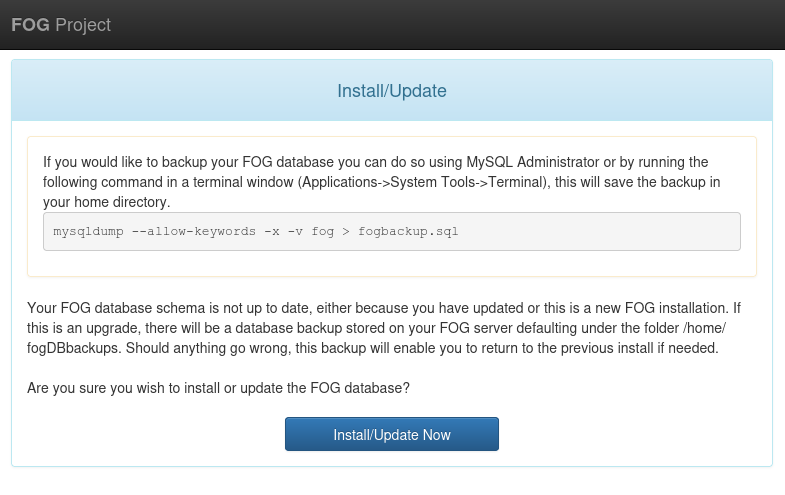
Prem el botó Install/Update Now

Un cop finalitzat, torna al terminal i prem ENTER per
continuar la instal·lació.
 * Update fogstorage database password.........................OK
 * Granting access to fogstorage database user.................OK
 * Setting up storage..........................................OK
 * Setting up and starting DHCP Server.........................OK
 * Configuring default iPXE file...............................OK
 * Setting up and starting TFTP Server.........................OK
 * Setting up and starting VSFTP Server........................OK
 * Setting up FOG Snapins......................................OK
 * Setting up UDPCast..........................................OK
 * Configuring UDPCast.........................................OK
 * Building UDPCast............................................OK
 * Installing UDPCast..........................................OK
 * Installing FOG System Scripts...............................OK


 * Configuring FOG System Services


 * Setting permissions on FOGMulticastManager.service script...OK
 * Enabling FOGMulticastManager.service Service................OK
 * Setting permissions on FOGImageReplicator.service script....OK
 * Enabling FOGImageReplicator.service Service.................OK
 * Setting permissions on FOGSnapinReplicator.service script...OK
 * Enabling FOGSnapinReplicator.service Service................OK
 * Setting permissions on FOGScheduler.service script..........OK
 * Enabling FOGScheduler.service Service.......................OK
 * Setting permissions on FOGPingHosts.service script..........OK
 * Enabling FOGPingHosts.service Service.......................OK
 * Setting permissions on FOGSnapinHash.service script.........OK
 * Enabling FOGSnapinHash.service Service......................OK
 * Setting permissions on FOGImageSize.service script..........OK
 * Enabling FOGImageSize.service Service.......................OK
 * Setting up FOG Services.....................................OK
 * Starting FOGMulticastManager.service Service................OK
 * Starting FOGImageReplicator.service Service.................OK
 * Starting FOGSnapinReplicator.service Service................OK
 * Starting FOGScheduler.service Service.......................OK
 * Starting FOGPingHosts.service Service.......................OK
 * Starting FOGSnapinHash.service Service......................OK
 * Starting FOGImageSize.service Service.......................OK
 * Setting up NFS configuration file...........................OK
 * Setting up exports file.....................................OK
 * Setting up and starting RPCBind.............................OK
 * Setting up and starting NFS Server..........................OK
 * Linking FOG Logs to Linux Logs..............................OK
 * Linking FOG Service config /etc.............................OK
 * Ensuring node username and passwords match..................Done
 * Setting up FOG External Reporting...........................Done

 * Setup complete

   You can now login to the FOG Management Portal using
   the information listed below.  The login information
   is only if this is the first install.

   This can be done by opening a web browser and going to:

   http://10.0.2.10/fog/management

   Default User Information
   Username: fog
   Password: password

 * Changed configurations:

   The FOG installer changed configuration files and created the
   following backup files from your original files:
   * /etc/dhcp/dhcpd.conf <=> /etc/dhcp/dhcpd.conf.1783619399
   * /etc/vsftpd.conf <=> /etc/vsftpd.conf.1783619399
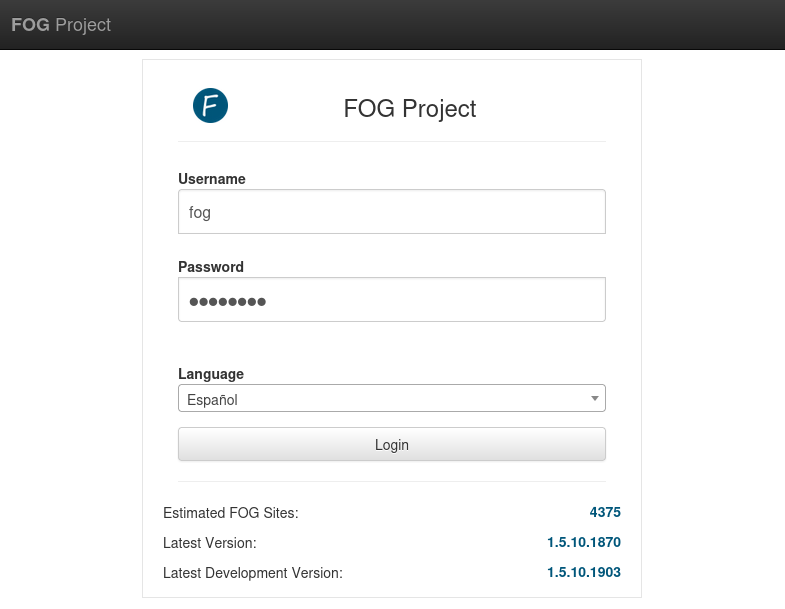
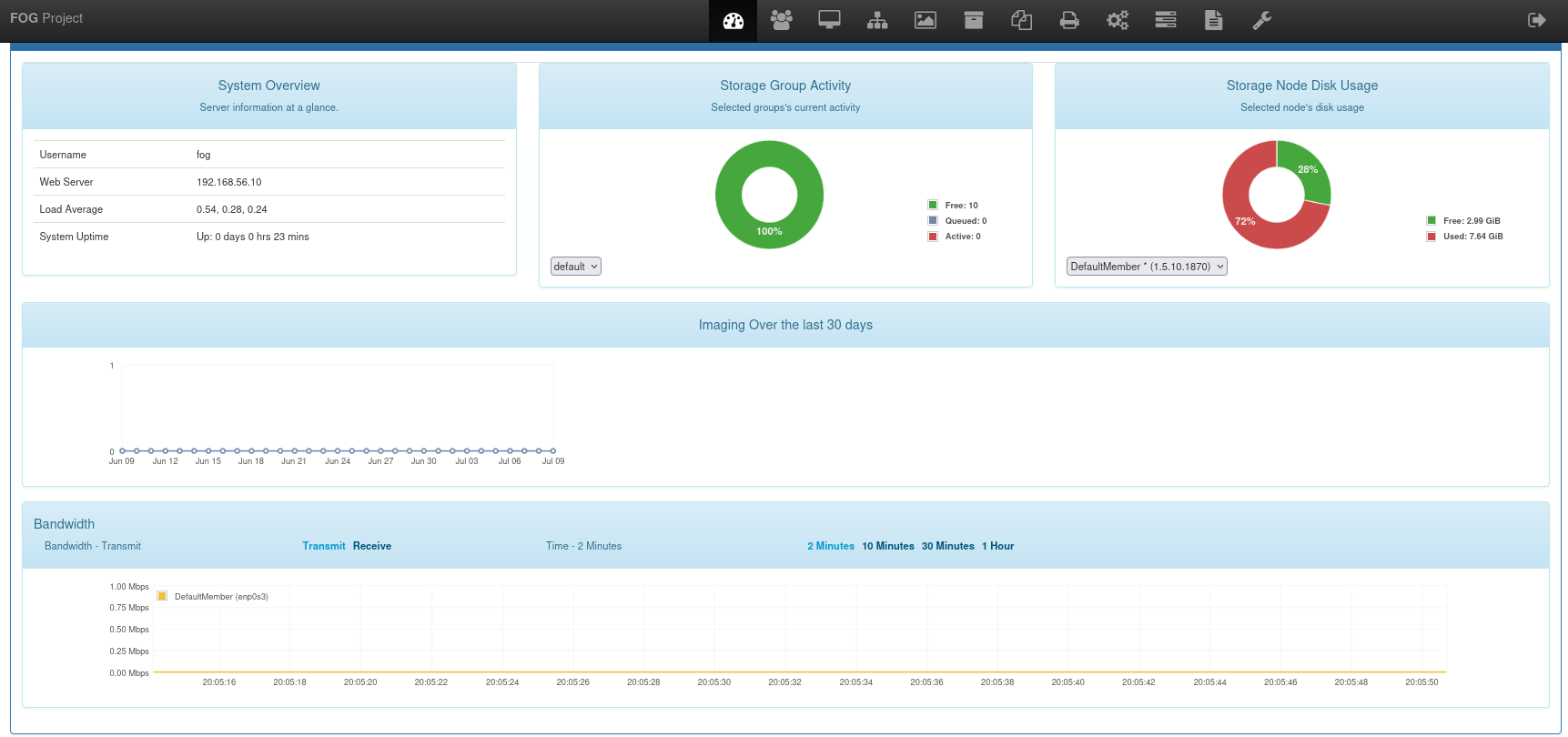
* /etc/exports <=> /etc/exports.1783619399Accedeix al portal web amb les credencials per defecte:
| Camp | Valor |
|---|---|
| URL | http://<IP>/fog/management |
| Usuari | fog |
| Contrasenya | password |
Canvia la contrasenya per defecte immediatament després del primer accés.
Si ja tens un servidor DHCP a la xarxa (el cas més habitual en entorns de producció), cal configurar dues opcions perquè els clients puguin arrancar per xarxa amb FOG:
Servidor TFTP
Configura l’opció 66 amb la IP o el nom de l’amfitrió del servidor FOG.
next-server 10.0.2.10; # IP del servidor FOGNom del fitxer d’arrencada
| Entorn | Fitxer recomanat |
|---|---|
| UEFI modern | snponly.efi o ipxe.efi |
| BIOS llegat | undionly.kpxe o undionly.kkpxe |
filename "snponly.efi"; # Per a clients UEFIPots consultar tots els fitxers disponibles al directori /tftpboot del servidor FOG.
ramon@server:~$ ls /tftpboot
10secdelay    intel.kpxe  ipxe.krn            realtek.efi    undionly.kkpxe
arm64-efi     intel.pxe   ipxe.lkrn           realtek.kkpxe  undionly.kpxe
default.ipxe  ipxe.efi    ipxe.pxe            realtek.kpxe   undionly.pxe
i386-efi      ipxe.iso    ipxe.usb            realtek.pxe
intel.efi     ipxe.kkpxe  memdisk             snp.efi
intel.kkpxe   ipxe.kpxe   ncm--ecm--axge.efi  snponly.efi
Entorn mixt BIOS/UEFI
Consulta la guia Bios and UEFI Co-Existence de la documentació oficial.
Afegeix aquestes línies al fitxer de configuració del servidor DHCP
(/etc/dhcp/dhcpd.conf), dins del bloc subnet
corresponent:
Per a clients UEFI:
next-server 10.0.2.10;       # IP del servidor FOG
filename "snponly.efi";      # Per a clients UEFI
Per a clients BIOS:
next-server 10.0.2.10;       # IP del servidor FOG
filename "undionly.kpxe";    # Per a clients BIOS
Reinicia el servei DHCP per aplicar els canvis:
sudo systemctl restart isc-dhcp-serverSi no tens accés al servidor DHCP o el dispositiu no suporta les
opcions 66/67, pots usar ProxyDHCP amb dnsmasq. Consulta la guia oficial: Proxy
DHCP with dnsmasq.
.fogsettingsTotes les opcions triades durant la instal·lació es desen al fitxer:
/opt/fog/.fogsettingsUna altra vegada que executis l’instal·lador, llegirà aquest fitxer i saltarà totes les preguntes (excepte la de l’esquema de la base de dades), anant directament al resum. Això fa que les reinstal·lacions i actualitzacions siguin molt senzilles.
Exemple de contingut:
## Start of FOG Settings
## Created by the FOG Installer
## Find more information about this file in the FOG Project wiki:
##     https://wiki.fogproject.org/wiki/index.php?title=.fogsettings
## Version: 1.5.10.1870
## Install time: Thu Jul  9 18:04:39 2026
ipaddress='10.0.2.10'
copybackold='0'
interface='enp0s3'
submask='255.255.255.0'
hostname='server'
routeraddress='10.0.2.1'
plainrouter='10.0.2.1'
dnsaddress=''
username='fogproject'
password='684HnC3)E5QpEAXN2p9f'
osid='2'
osname='Debian'
dodhcp='y'
bldhcp='1'
dhcpd='isc-dhcp-server'
blexports='1'
installtype='N'
snmysqlexternal='0'
snmysqluser='fogmaster'
snmysqlpass='s4HE9zK$2zLr3OiZ1Wv4'
snmysqlhost='localhost'
mysqldbname='fog'
installlang='1'
storageLocation='/images'
fogupdateloaded=1
docroot='/var/www/'
webroot='/fog/'
caCreated='yes'
httpproto='http'
startrange='10.0.2.10'
endrange='10.0.2.254'
packages='apache2 bc build-essential cpp curl g++ gawk gcc gcc-aarch64-linux-gnu genisoimage gettext git gzip htmldoc isc-dhcp-server isolinux language-pack-de language-pack-en language-pack-es language-pack-eu language-pack-fr language-pack-pt language-pack-zh-hans lftp libapache2-mod-php libc6 libcurl4t64 liblzma-dev m4 mariadb-client mariadb-server net-tools nfs-kernel-server openssh-server php php-bcmath php-cli php-curl php-fpm php-gd php-intl php-json php-ldap php-mbstring php-mysql tar tftpd-hpa tftp-hpa unzip vsftpd wget zlib1g '
noTftpBuild=''
tftpAdvOpts=''
sslpath='/opt/fog/snapins/ssl/'
backupPath='/home/'
php_ver='8.5'
sslprivkey='/opt/fog/snapins/ssl//.srvprivate.key'
sendreports='Y'
## End of FOG Settings
Per a la referència completa de totes les opcions disponibles, consulta: The .fogsettings file.
El procés d’actualització és essencialment el mateix que la
instal·lació inicial. En lloc de clonar de nou el dipòsit, cal fer un git pull i tornar a executar l’instal·lador:
cd fogproject
git pull
sudo bin/installfog.sh
L’instal·lador detectarà la configuració existent a .fogsettings i procedirà directament, sense fer preguntes
(tret de la confirmació de l’actualització de l’esquema de base de dades
des del navegador).
Si git pull dona errors indicant que hi ha canvis
pendents, executa primer:
git reset --hard origin/dev-branch
(substituint dev-branch pel nom de la branca que uses) i
torna a fer git pull.